|
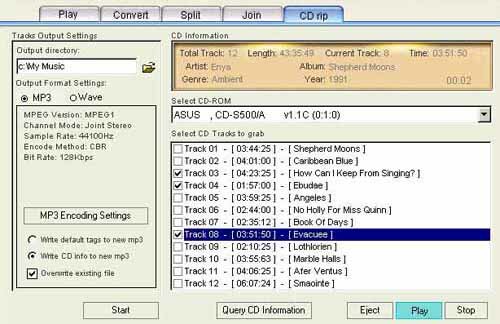
CD Ripper also called audio grabber, it support multi CD-Rom, with the CD rip function, you can convert Audio CD tracks which you like to MP3 or wave files or you can query information of myriad of CDs provided by FreeDB on the Internet for their Artist, Album, Genre, Year, tracks title. All these information will be automatically stored to your hard disk, or you may choose to write these information into MP3 tag information.
- CD Player
Insert a Audio CD into CD-Rom, select one CD-Rom( if you have more than one CD-Rom ), and click on any track you like with the mouse and press Play/Stop button to start playing the CD.
- Query CD information
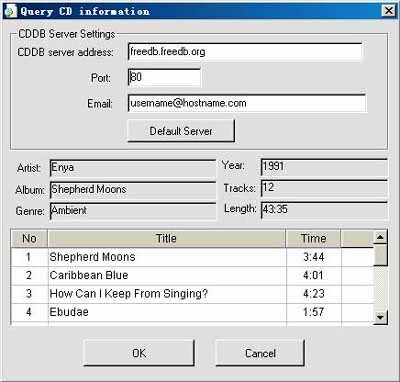
You can inquire about Audio CD information on the Internet, acquire the information of Artist, Album, Genre, Years, Tracks, Length of this particular CD and the title of all the tracks. The default CD database server is freedb.freedb.org, others including us.freedb.org and other database servers. You can go directly to http://www.freedb.org for information. If the program get the CD information which you need from the CD database, then information such as the title of the CD will be listed in the CD tracks and these information will be automatically stored in your local hard disk for the sake that such information is available next time and there will be no need to land on the Internet for another query.
- rip CD to mp3 or wave
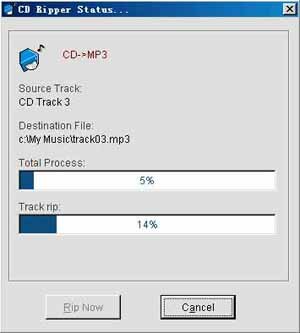
After all the set is done, choose from the CD tracks list the tracks which you want to rip, all the tracks you have chosen will be converted to MP3 or wave files just in one time.
|