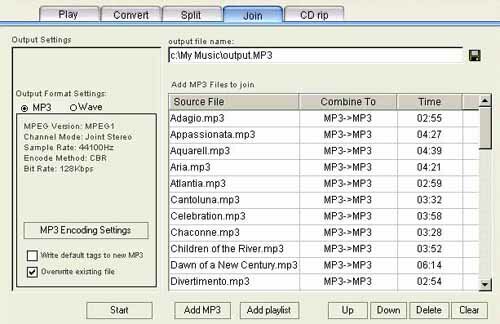
Join function enable you to merge any amount MP3 files into one MP3 or Wave file. Just add MP3 files into MP3 Files list and adjust the file order by Up, Down key, you can merge hours of MP3 files into one single file.)
- Output file name
The merged MP3 or wave file will be saved in the designated folder, you can decide by yourself the position and name of the merged file.
- Output Music Settings: MP3 or Wave
You can set the encode/decode information for the MP3 and Wave after joining, Click MP3 Encoding Settings and the setting of MP3 encoding begins. Please refer to Default settings/ MP3 encoding Settings. All Wave files decoded from MP3 will remain MP3กฏs channel information, sample rate.
- Write default tags to new mp3
It is up to you whether to write default tag name information into the newly joined MP3 files. Please refer to Default Tag name Edit.
- Overwrite existing file
During joining, if you choose overwrite existing file, then the program will overwrite files bearing the same name, if you choose not, there will be a prompt whether to overwrite.
-
Start to join
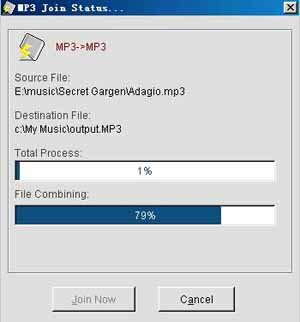
Press the Start button and starts the joining/merging of the files in the list. As the join/merge program needs to process MP3 encoding of big files, the more the files, the longer the time will take for merging and encoding. That depends on your computer performance.
|