|
|
|
With the free mp3 player / manager, mp3 renamer and mp3 tag editor of MP3 Wav Editor, you can manage your favorite mp3s easily, rename mp3 with its artist,title,album.
|
|

- MP3 Player/Manager
MP3 Wav Editor executes the classify management on the basis of Playlist. You must create a Playlist before any MP3 files of this kind can be added into. Press Playlists button to create a new Playlist name then click Add button to add the MP3 files that you like. You can add a directory in one time, the program will automatically add all MP3 files under this directory into the Playlist, while you can also import the M3U Playlist of Winamp. Change the playing order of the MP3 files by up and down arrow.
¡¡
- MP3 renamer
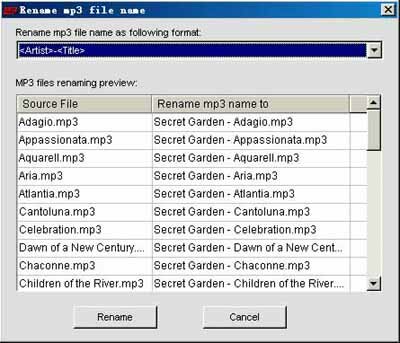
Just imagine that you have a lot of MP3 files entitled with 01.mp3, 02.mp3¡¡100.mp3, it will be difficult to tell what songs they are. But with the MP3 rename function, it is easy to take the information of Artist, Title, Album as the file name of the file. If the MP3 file has no Tag name information, you can use the above-mentioned Tag name Edit function to fill with. MP3 rename can revise a lot of MP3 files one time, which is of great help to mass management of MP3 files.
- MP3 Tag name Editor
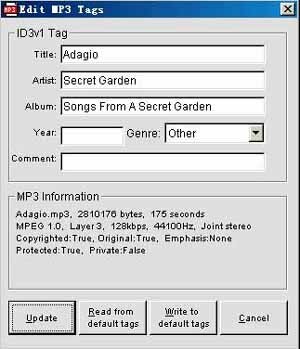
Choose one MP3 in the MP3 list, click Tag Edit button and you can revise the Title, Artist, Album, Year, Genre, Comment information of this MP3 file. You may set the content of the default tag beforehand (please refer to Default Settings/Default tag name) or write these information into Default tag. Just press Update button and these information will be written into this MP3.
|
|
|
|