|
Mp3 splitter, also called mp3 cutter. With one function of MP3 Wav Editor, you can split your large mp3 into small ones. You only specify the cutting start time and end time, it can cut the mp3s to small mp3 and wav.
|
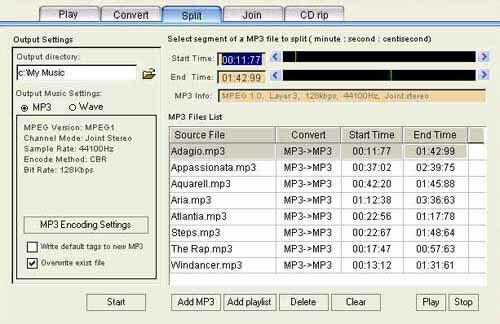
The MP3 Split function enable you to split MP3 files in batch process, the split is carried out according to your start time and end time and after the split, there will be newly created MP3 or Wave.
With the function of Add MP3 and Add playlist, you can add any MP3 file to the MP3 Files list. Click on the MP3 files that you'd like to split, then drag or click to change the start time and end time or you may directly input the start time and end time through keyboard by input the split time segment within the start time or end time. After input, only when Enter in pressed will the Scroll bar of the Start time and End time function. You can set various start time and end time for the MP3 files in the list, the program will process them in one step.
- Output directory
All newly created MP3 or Wave files after split will be saved in the output directory which you can set up. The default output directory is set in the Default Settings. The name of the split files remain unchanged.
- Output Music Settings: MP3 or Wave
You can set the encode/decode information for the split MP3 and Wave, Click MP3 Encoding Settings and the setting of MP3 encoding begins. Please refer to Default settings/ MP3 encoding Settings. All Wave files decoded from MP3 will remain MP3กฏs channel information, sample rate.
- Write default tags to new mp3
It is up to you whether to write default tag name information into the newly split MP3 files. Please refer to Default Tag name Edit.
- Overwrite existing file
During splitting, if you choose overwrite existing file, then the program will overwrite files bearing the same name, if you choose not, there will be a prompt whether to overwrite.
- Start to split
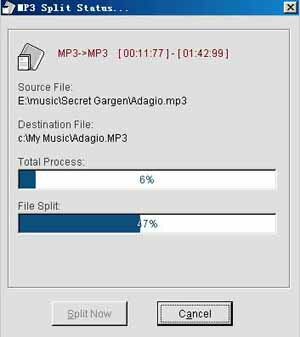
After all the setting is done, press Start button to split the files in the list. You can cancel the split by pressing Cancel button any time during splitting.
|